


McDonald's
McDonalds USA, LLC
I installed McDonald’s expecting a quick way to order food, but the app became more interesting once I looked past the menu screen. It combines ordering, restaurant information, deals, and a rewards system in one place, so its usefulness depends less on novelty and more on whether those tools fit your normal routine. My first impression was positive: the basic purpose is easy to understand, and I could move from browsing to choosing a pickup or delivery path without needing a separate food-ordering app.
That convenience comes with an important qualification. This is not a general restaurant discovery tool, a meal planner, or a way to compare every nearby fast-food option. It is a focused companion for McDonald’s USA, developed by McDonalds USA, LLC. If you already visit the chain occasionally, the app can make those visits more organized and potentially more rewarding. If you rarely eat there, its long-term value is much harder to justify.
How McDonald’s Holds Up Beyond the First Week
The first-week appeal is immediate and practical
During my first week with the app, the strongest benefit was reducing the number of small decisions involved in an order. Instead of standing in front of a menu board, I could look through the available choices at my own pace, consider a deal, and prepare the order before reaching the restaurant. That is especially useful when I am ordering for more than one person and need to check selections without holding up a line.
The interface is built around familiar McDonald’s categories and recognizable food items, which keeps the learning curve low. I did not need a tutorial to understand where to browse or how to start an order. The app’s store summary, “Order, Deals & Rewards,” is a fair description of the central experience, although the real appeal comes from how those parts work together rather than from any single screen.
Deals are likely to be the first feature that encourages repeated visits. They give me a reason to open the app before ordering instead of treating it as a digital menu. The useful habit is to check the offers before building the basket, because a deal can influence what I choose and may be less useful after I have already committed to a different combination. That simple change in order—offers first, meal second—makes the app feel more purposeful.
Latest News

Uber Eats Under Pressure: What Happens When Delivery Goes Wrong

How QR & Barcode Scanner Adapts to Android and iOS Innovations

Why Waze Navigation & Live Traffic Is Your Essential Travel Companion

CapCut Mastery: Unleash Hidden Features for Pro-Level Editing

How OS Updates Enhance Roblox Adventures

Teacher Simulator: Exam Time Turns Quick Classroom Judgments into a Repetitive Loop
The rewards section adds another layer to that routine. I found it most useful when I treated it as a record of ordinary visits rather than as a special event. A person who already buys McDonald’s from time to time can let rewards accumulate naturally, while someone downloading the app only for a single purchase may not notice much benefit. The system is therefore more compelling as a habit than as a one-time discount tool.
A realistic use case: ordering around a busy schedule
Imagine leaving work with a short break before an appointment. I would open the app, check the current offers, choose a nearby restaurant, and assemble the order before getting in the car. That workflow can be less stressful than deciding at the counter, particularly when I am also checking what another person wants. It also gives me a chance to review the basket before submitting it, which is useful for catching an unwanted item or an incorrect quantity.
For a family order, the advantage is not only speed. The app lets me separate the planning stage from the collection stage. I can make choices while everyone is still deciding, then place the order once the details are settled. I would still inspect the final screen carefully, because convenience can make it easy to move quickly past customizations or extras that affect the total.
Gallery
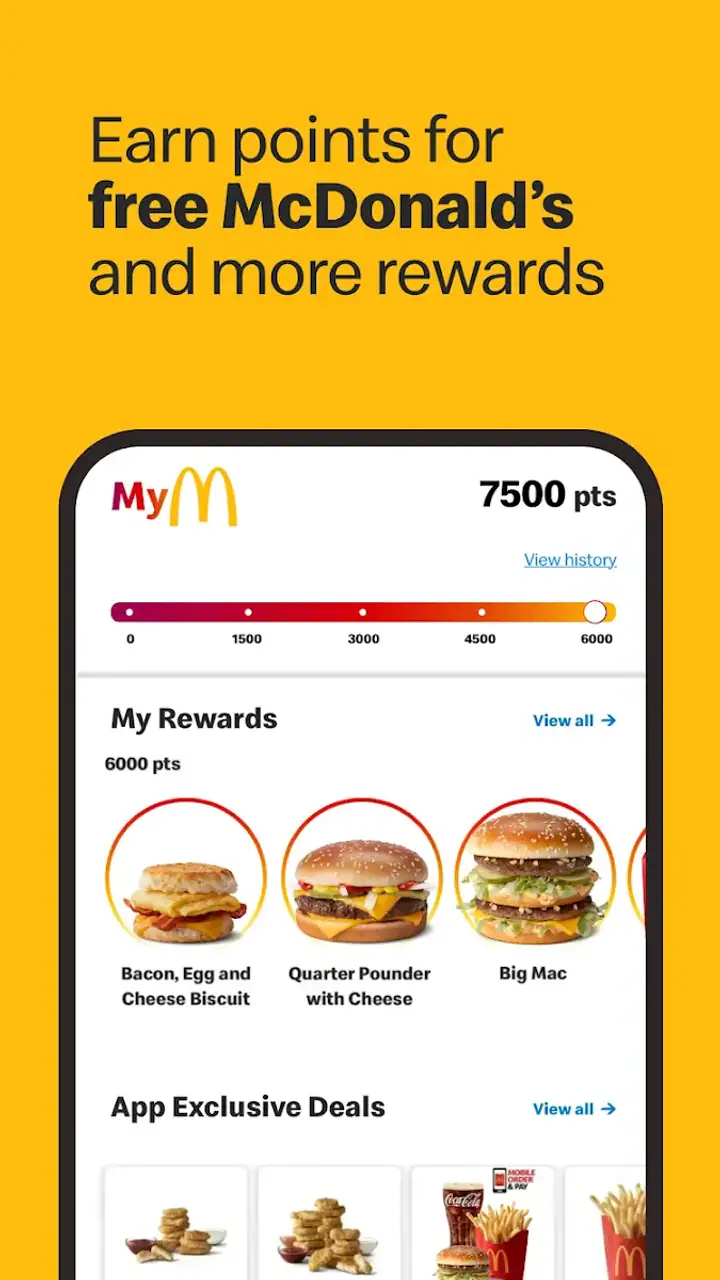
Another first-week strength is that the app keeps the McDonald’s experience in one familiar environment. I do not have to search a third-party delivery marketplace just to see the chain’s own ordering flow. That can be preferable when I want a direct, uncomplicated interaction with the restaurant rather than a crowded marketplace filled with unrelated menus.
Where the early excitement starts to fade
The first-week experience can feel more valuable than the month-to-month reality because the initial setup gives the app several things to show me at once: the menu, deals, rewards, and ordering process. After I understand those areas, opening the app becomes worthwhile only when I actually plan to order or want to check an offer. It does not create much reason to browse casually.
That is not necessarily a weakness. A food-ordering app should not demand attention for its own sake. Still, readers expecting a constantly engaging app may find the experience quiet between visits. Its best quality is functional restraint, but that also means the novelty disappears quickly.
Month-to-month value depends on your eating pattern
After the first month, I would judge the app by a simple question: does it improve orders I was already going to make? For regular McDonald’s customers, the answer can be yes. The recurring value comes from checking deals, keeping ordering details in one place, and making rewards part of the normal purchase flow. Those benefits are modest individually, but they can add up in convenience over repeated visits.
The app is free, which removes the biggest barrier to trying it. Its age rating is Everyone, so the presentation is broadly accessible, although younger users should still have an adult handle payment and ordering decisions. The app has been available since October 24, 2014, and its current version is 25.104.1. That long presence suggests it is intended as an established part of the McDonald’s experience rather than a short-lived promotional experiment.
Its scale is also clear from the store response: it has an average rating of 4.2 from around 2.2 million ratings, with roughly 400 thousand written reviews and over 50 million installs. Those figures do not guarantee that every restaurant visit will be smooth, but they show that the app has become a familiar tool for a large audience. I see that popularity as evidence of practical usefulness, not as a substitute for testing whether it suits my own ordering habits.
The strongest long-term users are people who visit often enough to make deals and rewards relevant, people who dislike waiting while deciding at a counter, and households that place several-item orders. Someone who orders from McDonald’s only once every few months may still appreciate the menu and ordering features, but the habit-building advantages will be weaker. In that case, a general delivery service or simply ordering in person may be more convenient than maintaining another app.
Three habits that make the app more useful
My first practical tip is to open the app before deciding what to eat. Deals can change the most sensible order, and checking them afterward turns a potentially helpful feature into an afterthought. I would compare the offer with the meal I actually want rather than choosing something solely because it appears discounted. A deal is only valuable if it matches the occasion and does not lead me to buy more than intended.
Second, I would use the review screen as a deliberate pause. Fast ordering encourages muscle memory, especially when I reorder familiar items. Before confirming, I would check the selected restaurant, order method, quantities, and any custom choices. This is a small workflow improvement, but it prevents the app’s speed from becoming a source of mistakes.
Third, I would treat rewards as a reason to consolidate visits, not as a reason to make unnecessary ones. If I am already planning a McDonald’s order, using the app can make that visit more worthwhile. If I am not hungry or would prefer another restaurant, chasing a reward can undermine the convenience the app is supposed to provide. That distinction matters for long-term value and personal spending.
The maintenance burden is low, but not invisible
McDonald’s is easy to keep installed if I use it regularly, but it still creates a small amount of digital maintenance. I need to keep the app updated, remember to check current offers, and make sure my order details are correct each time. The minimum operating-system requirement is version 9, which makes it accessible to many older devices, though the quality of the experience will still depend on the phone itself and the local ordering process.
The biggest maintenance task is behavioral rather than technical: remembering to open the app before ordering. If I forget and buy at the counter, the rewards and deal-checking benefits may not be part of that visit. An app can contain useful tools without automatically changing habits, so its lasting value depends on whether I build it into the moment when I am deciding what to order.
I also would not rely on the app as the only part of a time-sensitive plan. Digital ordering can save time, but restaurant preparation and collection still matter. If I am rushing to catch transport or attend an appointment, I would leave a margin rather than assuming that submitting an order guarantees an immediate handoff. The app improves the ordering step; it cannot remove every variable from the restaurant visit.
For users with limited storage or too many rarely used apps, the decision is straightforward. Keep it if McDonald’s is a recurring choice and the deals or rewards genuinely influence your orders. Remove it if it sits untouched for months. Since the app is free, the cost is less about money and more about screen space, notifications, account attention, and the temptation to open it when no purchase was planned.
What creates fatigue over time
The main source of fatigue is repetition. Once I know my usual meal, browsing the same menu can feel slower than simply saying the order aloud. The app is most helpful when I am comparing choices, applying an offer, ordering for several people, or trying to avoid a queue. For a single familiar order, the advantage may be too small to notice.
Another limitation is its narrow scope. It serves McDonald’s rather than helping me decide among nearby restaurants. A third-party delivery app may be better when I want to compare cuisine, delivery availability, fees, or multiple restaurants in one session. Ordering directly through McDonald’s can feel cleaner when I already know the destination, but it is not the right tool for broad local discovery.
Deals can also create mental clutter. Seeing an offer is useful, yet repeatedly evaluating whether it fits my meal can make a simple purchase feel like a small optimization exercise. I prefer to use promotions as a quick check, not as a puzzle. If the offer requires me to change the order substantially, I would rather choose the food I actually want and keep the process simple.
Rewards have a similar trade-off. They can make regular visits feel more organized, but they may encourage me to think about the next purchase before I need one. I would recommend setting a personal rule: use rewards when they align with normal eating plans, and ignore them when they do not. That keeps the app useful without allowing the reward loop to dictate every decision.
There is also a practical difference between browsing and fulfillment. The app can present an appealing, orderly menu, while the real experience still depends on the selected restaurant and the collection or delivery process. I would not judge the entire app by one delayed order, but I would remember that the digital layer is only one part of the transaction. This is why I see it as a convenience tool rather than a guarantee of a perfect meal experience.
Who should use it, and who should skip it?
I would recommend McDonald’s to regular customers, busy households, and anyone who likes reviewing the menu before reaching the counter. It is particularly suitable for people who can build a repeatable routine: open the app, inspect deals, choose the restaurant, review the basket, and then place the order. That sequence makes the app feel like a useful assistant instead of a decorative shortcut.
I would be less enthusiastic for people who rarely eat at McDonald’s, prefer supporting several local restaurants, or want one app for comparing every delivery option. The usual alternative—a general delivery marketplace—can be more flexible for restaurant discovery, while in-person ordering remains perfectly reasonable for a quick, uncomplicated purchase. The McDonald’s app wins when brand-specific convenience matters more than variety.
It may also be a poor fit for anyone who dislikes managing rewards or checking promotions. The app does not need constant attention, but it rewards users who remember to consult it. If that extra step feels annoying, the practical benefit may not justify keeping it installed, even though the download itself is free.
My long-term verdict
After the novelty fades, McDonald’s earns lasting space on my phone only when I visit the chain often enough to use its ordering, deals, and rewards together. The app is not exciting in the traditional sense, and that is fine. Its value is recurring and practical: less counter-time, easier planning, a quick look at available offers, and a clearer way to manage familiar orders.
I would not install it expecting every meal to become faster or cheaper. I would install it because I already choose McDonald’s and want a more deliberate way to place those orders. The best results come from checking deals before selecting food, reviewing the basket carefully, and treating rewards as a bonus rather than a reason to spend.
My recommendation is simple: keep it if McDonald’s is part of your regular routine; skip it if you need restaurant variety or only visit occasionally. In my experience, it succeeds as a focused Food & Drink app from McDonalds USA, LLC, not as an all-purpose food service. For the right user, that narrow purpose is exactly why it remains useful after the first week.
McDonald’s is free, rated Everyone, and available for devices running OS 9 or later. Its strong store presence reflects a mature product with broad reach, but the final decision should come down to habit. If the app helps you make real, planned visits easier month after month, it has earned its place. If it only reminds you of a restaurant you seldom use, the novelty will probably disappear before the practical value begins.
FAQs for McDonald's
What features does the McDonald's app offer?
The McDonald's app provides a variety of features including mobile ordering, exclusive deals, and discounts. Users can also locate the nearest McDonald's, customize their orders, and participate in the loyalty program to earn rewards. Additionally, the app allows users to save their favorite orders for quick reordering.
Is it safe to make payments through the McDonald's app?
Yes, the McDonald's app uses secure payment methods to protect your financial information. The app supports major credit and debit cards, and transactions are encrypted. Users can also link mobile payment services like Apple Pay and Google Pay for an additional layer of security.
Can I customize my order through the app?
Absolutely! The McDonald's app allows for extensive customization of your order. You can adjust ingredients, add special instructions, and save your favorite customizations for future use. This feature ensures you get your meal exactly how you like it every time you order.
How do the rewards and loyalty program work?
The McDonald's app includes a rewards and loyalty program where users can earn points with each purchase. These points can be redeemed for free items or discounts on future orders. The app regularly updates with new promotions, making it easy to maximize your benefits.
Are there any drawbacks to using the McDonald's app?
While the app offers many conveniences, some users may experience occasional technical issues such as slow loading times or difficulties with GPS location services. Additionally, not all locations may support mobile ordering, so it's best to check availability in your area before relying on this feature.
Pros
- Intuitive and user-friendly interface.
- Exclusive offers and discounts available.
- Order customization is straightforward.
- Quick access to nearest locations.
- Efficient integration with payment options.
Cons
- Limited menu items in some regions.
- Occasional app performance lags.
- Requires location permissions.
- Frequent updates can be bothersome.
- Push notifications can be intrusive.


